Important update: encrypted emails from IFGL
We wanted to let you know about an update that helps us protect your (and your clients’) information even more effectively when we email you.
From time to time we’ll send information by email that includes sensitive details. We’re introducing Microsoft Purview encryption so those messages are protected automatically and consistently.
What’s changing (from Wednesday 6 May)
- Where an email contains personally identifiable information (PII), it will be automatically encrypted.
- Emails containing credit card numbers will continue to be blocked and won’t be sent by email.
What you will see
- Most of the time, you won’t notice any difference.
- For encrypted messages, you may see a “Read the message” link/button to open the email securely (depending on your email setup, it may also open directly in your inbox or you may be presented with the option to receive a one-time code).
- You don’t need any special software—just follow the on-screen steps.
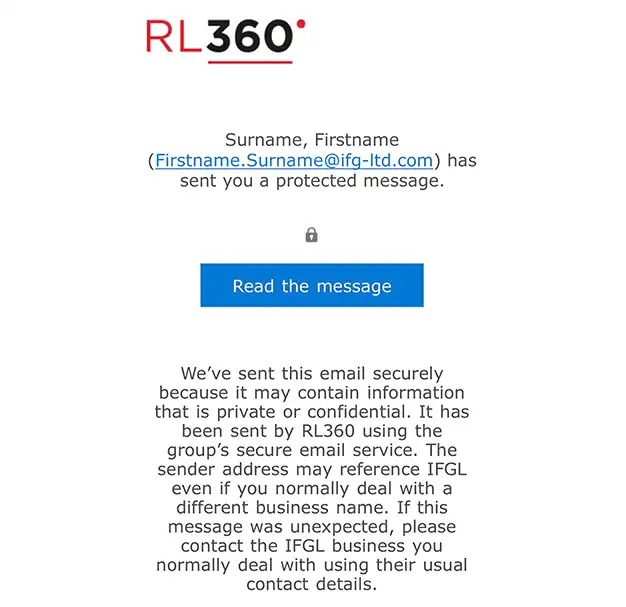
How to verify an encrypted email is genuine
- Check the sender’s email domain is one of ours (see list below).
- Before clicking any link/button, hover over it and confirm it starts with https://outlook.office365.com/encryption.
- Once opened, you should see our branding on the secure message page.
- We will never ask you for passwords by email.
Our sending domains: @rl360.com, @fr0.rl360.com
What you need to do
Nothing in advance - just be aware that some messages may arrive encrypted from Wednesday 6 May. If you have any trouble opening an encrypted email, please contact your usual IFGL contact and we’ll help get it sorted quickly.